Edit either view
Preview and Source are equal editing surfaces, with the same toolbar, menus, and shortcuts.
A native macOS Markdown editor
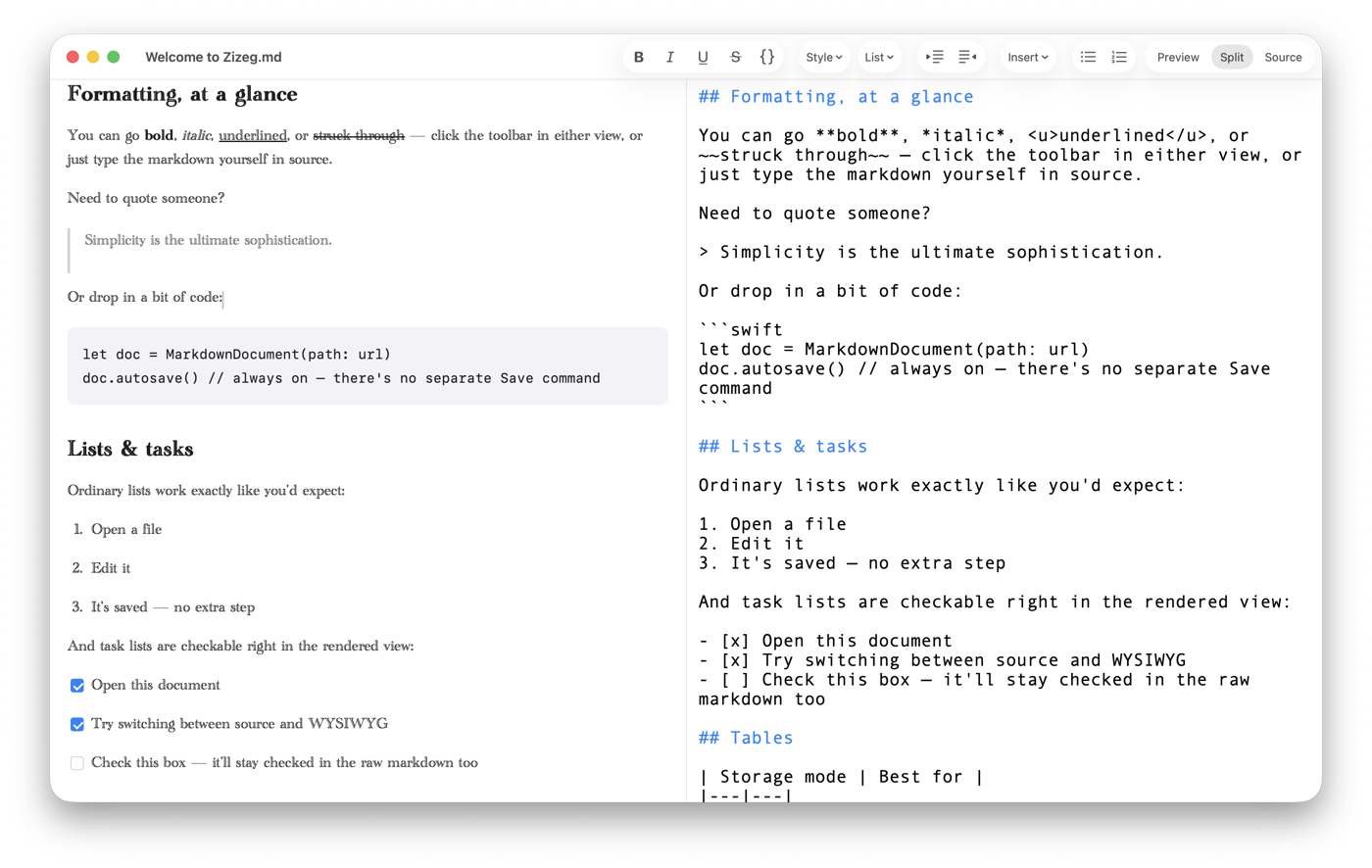
Edit the rendered Preview like a normal document, or work directly in Markdown Source. Use them side by side or separately—they stay in sync in the same plain .md file.
No vault. No proprietary format. Just your file, edited the way that fits the moment.
 Available now on the Mac App Store
Made for more than one Mac language
Choose Zizeg’s interface language in Preferences. The built-in Help follows your Mac’s language.
Preview and Source are equal editing surfaces, with the same toolbar, menus, and shortcuts.
Work directly with ordinary Markdown on disk—no library, import step, or proprietary database.
Native document tabs, menus, toolbar, autosave, Finder files, and independent typography for each view.
Remote images remain blocked until you approve them, without rewriting the Markdown behind your back.
Choose your view
The document never changes format when you change views. Only the way you interact with it changes.
Write with headings, lists, tables, links, and formatting shown in place—without giving up direct editing.
Edit either Preview or Source while the other side updates. Synchronize scrolling or let each pane move independently.
Work with the syntax itself, with row numbers, Find, and the same formatting commands available in Preview.
Built for real Markdown workflows
Zizeg covers the expected Markdown tools, then adds careful handling for the files, images, safety, and exports around the document.
Use the toolbar, menus, or shortcuts in Preview or Source. Commands toggle formatting on and off, and Source always remains real Markdown.
Paste images into a sibling assets folder or embed them for single-file portability. Zizeg can repair asset paths after a Finder rename.
Zizeg sanitizes when rendering or exporting, flags unsupported content, and asks before loading remote images. Your saved source remains yours.
Navigate with a table of contents and row numbers, then export self-contained HTML or multi-page PDF with control over remote assets.
Especially useful for AI-generated Markdown
AI tools constantly produce READMEs, instruction files, specifications, plans, changelogs, and summaries. Review and correct them visually or in raw source while every document stays plain, portable Markdown.
Zizeg itself does not use AI or send your documents to an AI service. It simply makes the Markdown around AI-assisted work easier to maintain.
See it
Simple access
Open and read Markdown for free. Unlock editing and export with a lifetime purchase or a short subscription.
One purchase. Edit and export without an ongoing subscription.
Includes a 7-day free trial before the subscription begins.
Includes a 7-day free trial and the same editing and export features.
USD reference pricing. Local Mac App Store prices vary by region.
Already comparing Markdown editors?
Compare Zizeg with Clearly, Typora, Obsidian, iA Writer, and the closest technical alternative, Ferrite.
Open the comparison